Orange Cup Tennis Score Keeper4.40
Publisher Description

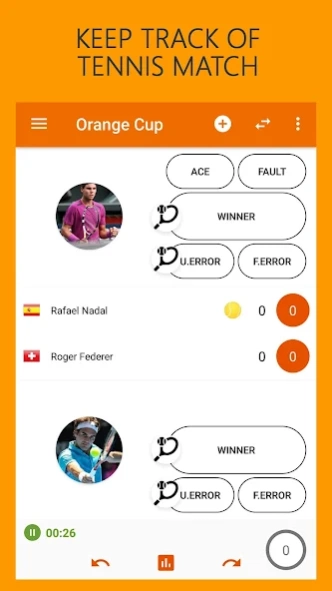


Keep track of your matches with ease. Manage tennis players, save your tennis matches score. Track your tennis match statistics. Keep your tennis score history in one place. Save the tennis score at any time and continue later.
You can select stroke types (backend, backend volley, forehand, forehand volley, and smash) by taping on the small circle racquet button inside the Winner or Unforced error button. It will open stroke types buttons.
New Features:
✓ Dark Theme
✓ Rally counter -> circle in the bottom right corner
✓ New Statistics for tracking rally lengths
Features:
✓ Statistics for every set
✓ Match details for every set
✓ Stroke type statistics
✓ Support for Doubles Match
✓ Support for almost all scoring systems
✓ Undo and Redo your points
✓ Save and Load your matches at any time
✓ Create a player list
✓ Export statistics in CSV file
✓ Share your matches with friends
✓ Simple match timer
✓ AutoSave Option
✓ Tennis Quiz
✓ English, Italian and Croatian language
About Orange Cup Tennis Score Keeper
The company that develops Orange Cup Tennis Score Keeper is Ante Kristic. The latest version released by its developer is 4.40.
To install Orange Cup Tennis Score Keeper on your Android device, just click the green Continue To App button above to start the installation process. The app is listed on our website since 2020-03-02 and was downloaded 2 times. We have already checked if the download link is safe, however for your own protection we recommend that you scan the downloaded app with your antivirus. Your antivirus may detect the Orange Cup Tennis Score Keeper as malware as malware if the download link to com.akristic.www.tkrally is broken.
How to install Orange Cup Tennis Score Keeper on your Android device:
- Click on the Continue To App button on our website. This will redirect you to Google Play.
- Once the Orange Cup Tennis Score Keeper is shown in the Google Play listing of your Android device, you can start its download and installation. Tap on the Install button located below the search bar and to the right of the app icon.
- A pop-up window with the permissions required by Orange Cup Tennis Score Keeper will be shown. Click on Accept to continue the process.
- Orange Cup Tennis Score Keeper will be downloaded onto your device, displaying a progress. Once the download completes, the installation will start and you'll get a notification after the installation is finished.
Program Details
System requirements
Download information
Pricing
Version History
version 4.40
posted on 2020-03-02
New App Settings:
- Dark Theme to save you some battery
- Ball animation can now be turned off
Save bug fixed
Some minor changes
